| Intranet Standards | |
 |
|
| Policies | |
| Procedures | |
 |
Resources |
| Help | |
| Children's Guidelines | |
|
|
| Notification Form | |
| Getting Started | |
|
Setting Up a Site Map |
| Writing Style Guide | |
| Design Style Guide | |
| Branding & Identity |
| It may be tempting to just jump in and start writing pages and adding
graphics here and there. But if you want to make a good impression and
have folks stick around and actually use your site, you have to make it
easy for them to get around.
If your site has more than two levels, give some thought as to how people will navigate around. They don't want to have to click on six or seven links to get to the one that interests them. Look at what other sites are doing. What do you like about them? Well-organized content will probably be among the top reasons it attracts you. Make the important information prominent. Think in terms of levels. A couple of examples follow:
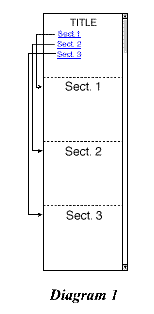
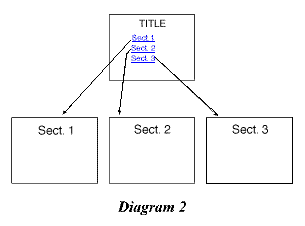
This one- or two-level map is sufficient for the initial meeting with Information Services. At a later time (see Step 4: The Site Map) you can create a more detailed site map with several levels showing all the information you want to include and how a visitor might navigate around it. It can be written in outline form or use flow chart software to create a more formalized site map. An outline might look like this: I. New energy company home page
Do not use "home" as a link to refer to your main ("index" or "default") page. If you wish to link back to your main ("index" or "default") page, use the name or description of your sub-site. Do not use a link labeled "contact us" for your sub-site e-mail or contact information. Instead use, "to e-mail us" or "to contact Accounting Services." Have you secured permission for any copyrighted photos, graphics, music, video, documents? Is the permission for Web use? Unless you are the author/creator, assume that all materials you plan to use are copyrighted until you check it out. The Information Resource Center can help you. |
 |