

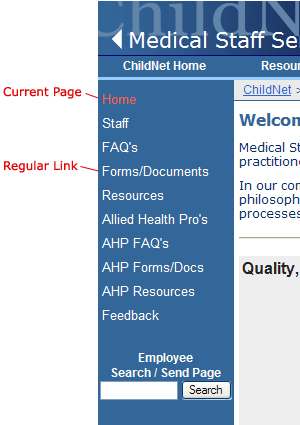
 Left Navigation is the secondary navigational area for the Intranet. For increased usability, the link for the current page is colored red. The background color of the Left Navigation area is "#336699". This secondary navigational area is completely customized by each department to make it easy for users to navigate within their own sub-site. In some rare cases a sub-site is so large that they need an additional area of navigation. In these cases, Right Navigation can be added. The Laboratory sub-site is a perfect example of a site that uses both a left and Right Navigation area.
These main category links can be expanded, by clicking on the Plus Icon, to reveal links relative to that category. Left Navigation is the secondary navigational area for the Intranet. For increased usability, the link for the current page is colored red. The background color of the Left Navigation area is "#336699". This secondary navigational area is completely customized by each department to make it easy for users to navigate within their own sub-site. In some rare cases a sub-site is so large that they need an additional area of navigation. In these cases, Right Navigation can be added. The Laboratory sub-site is a perfect example of a site that uses both a left and Right Navigation area.
These main category links can be expanded, by clicking on the Plus Icon, to reveal links relative to that category.The current category or subcategory selected is noted in orange. Selecting items from within these subcategories will take the user to an actual content page (usually an Template01 page). See Template01 navigation to learn more about creating navigational elements within a department. The goal of the Left Navigational area is to link to major web pages within a departmental website. To add links to the Left Navigational area, view the online tutorial in the web editors section. |